Startup
This tutorial is necessary to run the repository with your own configurations.
Fork 24-2-mlops-project-car_object_detection, clone the repository and install all the requirements with:
git clone https://github.com/fork-name

pip install -r requirements.txt
Ensure Python version 3.12 is being used
WARNING
If you would like to run with GPU, download CUDA Toolkit 12.6 https://developer.nvidia.com/cuda-downloads
Create .env file in the root of the repository
ROBOFLOW_API_KEY=""
AWS_ACCESS_KEY_ID=""
AWS_SECRET_ACCESS_KEY=""
AWS_REGION=""
AWS_LAMBDA_ROLE_ARN=""
INFO
ROBOFLOW_API_KEYRoboflow API key to download dataset.AWS_ACCESS_KEY_IDAWS access key id.AWS_SECRET_ACCESS_KEYAWS secret access key.AWS_REGIONAWS region.AWS_LAMBDA_ROLE_ARNAWS Lambda role ARN.
Create two S3 buckets. The first one will store the ONNX object detection model and the second one will store all the datasets from the data versioning.
python3 data/s3_bucket.py --bucket_model bucket-model-name --bucket_dataset bucket-dataset-name
This command will automatically save the bucket name in the .env file:
BUCKET_MODEL="bucket-model-name"
BUCKET_DATASET="bucket-dataset-name"
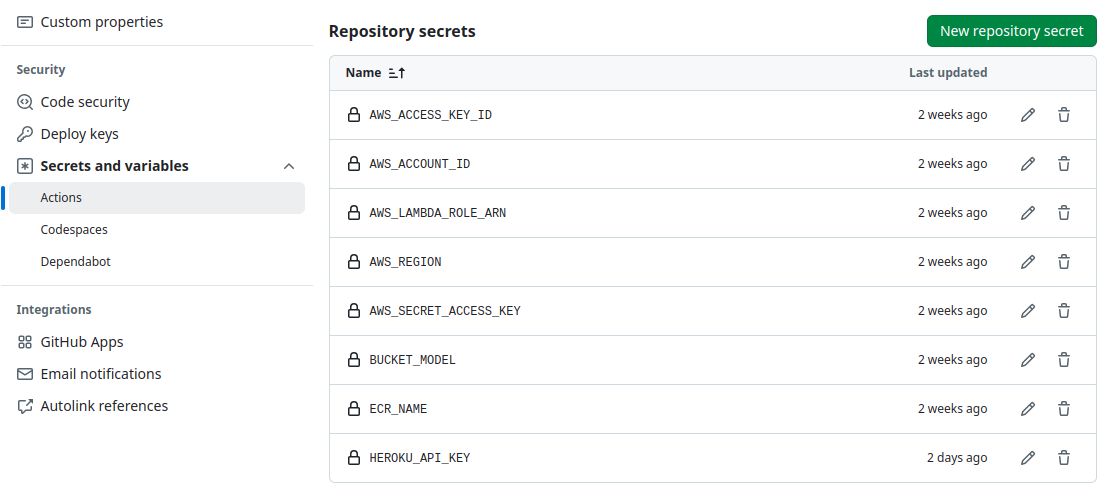
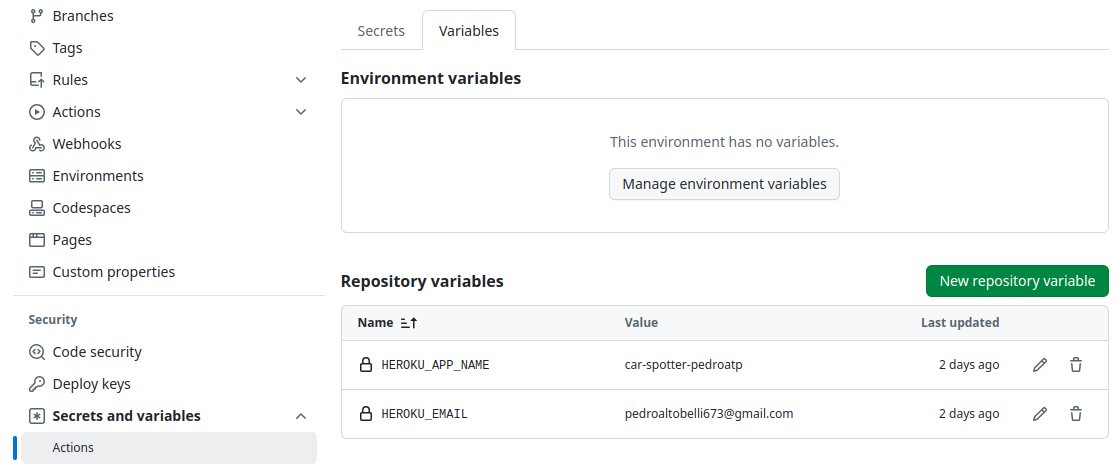
Add the following secrets and variables in the “Actions secrets and variables” section at settings
INFO
AWS_ACCESS_KEY_IDAWS access key ID.AWS_SECRET_ACCESS_KEYAWS secret access key.AWS_REGIONAWS region.AWS_LAMBDA_ROLE_ARNAWS Lambda role ARN.AWS_ACCOUNT_IDAWS account ID.BUCKET_MODELis the name of the bucket were the model is stored.ECR_NAMEis the name of the ECR container.HEROKU_API_KEYAPI key from Heroku. Necessary for deploying the website.HEROKU_APP_NAMENAme of the Heroku app.HEROKU_EMAILEmail of the Heroku
In the file
app/setup.sh, change to:
#!/bin/bash

mkdir -p ~/.streamlit/

echo "\
[general]\n\
email = \"your-email.com\"\n\
" > ~/.streamlit/credentials.toml

echo "\
[server]\n\
headless = true\n\
enableCORS=false\n\
port = $PORT\n\
" > ~/.streamlit/config.toml